|
|

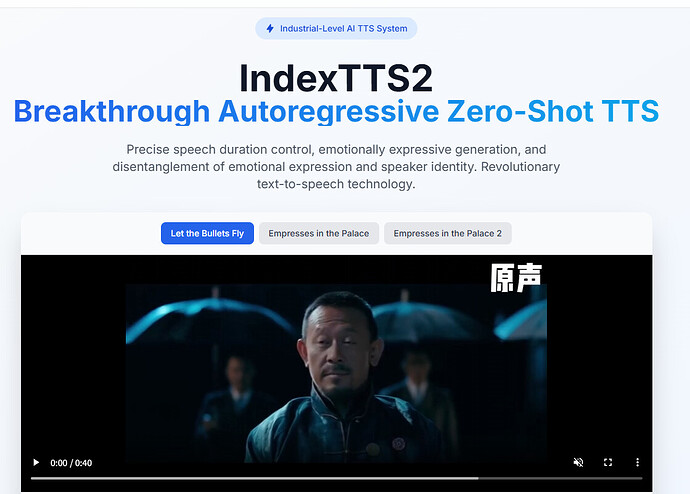
近年来,零样本语音合成(Zero-Shot TTS)在声音克隆和语音合成领域发展迅速。
然而,自回归(Autoregressive)TTS 虽然具备更自然的生成效果,却存在一个核心痛点:语音时长难以精确控制。
这在影视配音、动漫、游戏角色语音等需要音画严格对齐的场景中,成为了一大障碍。
IndexTTS2 正是在此背景下推出的突破性工作。它不仅首次实现了自回归模型下的时长可控合成,还将说话人音色与情感表达解耦,并支持基于文本的情感控制,大幅提升了 TTS 的可用性与表现力。
开源地址:GitHub - index-tts/index-tts: An Industrial-Level Controllable and Efficient Zero-Shot Text-To-Speech System (https://github.com/index-tts/index-tts/)
demo地址:IndexTTS2: A Breakthrough in Emotionally Expressive and Duration-Controlled Auto-Regressive Zero-Shot Text-to-Speech (https://index-tts.github.io/index-tts2.github.io/)
论文地址:[2502.05512] IndexTTS: An Industrial-Level Controllable and Efficient Zero-Shot Text-To-Speech System (https://arxiv.org/abs/2502.05512)
(https://linux.do#p-9002485-h-1)技术亮点
(https://linux.do#p-9002485-h-1-2)1. 时长可控机制
可控模式:通过在生成时指定目标 token 数,严格控制语音时长。
自由模式:不限制 token 数,自然生成语音,保持语调和韵律。
(https://linux.do#p-9002485-h-2-3)2. 声音与情感解耦
通过梯度反转层(GRL)训练,使模型能分离 说话人音色 与 情感特征。
这样用户可以自由组合:
指定一个人的音色
再叠加另一段语音的情绪
(https://linux.do#p-9002485-h-3-4)3. 文本驱动的情感控制
内置 T2E(Text-to-Emotion)模块,基于 Qwen-3 微调模型,将自然语言描述转为情绪向量。
用户只需输入一句文字描述,例如 "愤怒地质问",即可驱动合成语音的情绪表现。
(https://linux.do#p-9002485-h-4-gpt-latent-5)4. GPT Latent + 三阶段训练
引入 GPT latent 表征,提升强情感场景下的语音稳定性和清晰度。
三阶段训练策略解决了数据不足和过拟合问题,使合成结果更加自然流畅。
(https://linux.do#p-9002485-h-5-6)5. 开源与可复现
提供完整开源代码与模型权重(HuggingFace & ModelScope),支持研究与二次开发。
(https://linux.do#p-9002485-h-7)

应用场景

影视/动漫配音:保证音画严格对齐

虚拟主播与数字人:可控的情绪驱动,更加自然生动

跨语言配音:任意音色+情绪迁移

广告与新闻播报:节奏感强、情绪可控
(https://linux.do#p-9002485-h-8)

模型下载
平台地址HuggingFace

IndexTTS-2ModelScopeIndexTTS-2 (https://modelscope.cn/models/IndexTeam/IndexTTS-2)GitHub 源码IndexTTS GitHub (https://github.com/index-tts/index-tts)
(https://linux.do#p-9002485-h-9)

本地快速启动指南
(https://linux.do#p-9002485-h-1-10)1. 环境准备
确保已安装:
git (https://git-scm.com/downloads)
git-lfs (https://git-lfs.com/)
启用 Git-LFS:
git lfs install
克隆仓库:
git clone https://github.com/index-tts/index-tts.git && cd index-tts
git lfs pull
安装依赖(推荐使用 uv (https://docs.astral.sh/uv/getting-started/installation/)):
uv sync --all-extras
若下载缓慢可切换国内镜像:
uv sync --all-extras --default-index "https://mirrors.tuna.tsinghua.edu.cn/pypi/web/simple"
(https://linux.do#p-9002485-h-2-11)2. 下载模型
HuggingFace 下载:
uv tool install "huggingface_hub[cli]"
hf download IndexTeam/IndexTTS-2 --local-dir=checkpoints
ModelScope 下载:
uv tool install "modelscope"
modelscope download --model IndexTeam/IndexTTS-2 --local_dir checkpoints
(https://linux.do#p-9002485-h-3-web-demo-12)3. 启动 Web Demo
uv run webui.py
浏览器访问 http://127.0.0.1:7860 即可使用。
(https://linux.do#p-9002485-python-13)Python 使用示例
(https://linux.do#p-9002485-h-14)语音克隆
from indextts.infer_v2 import IndexTTS2
tts = IndexTTS2(cfg_path="checkpoints/config.yaml", model_dir="checkpoints")
text = "你好,这是 IndexTTS2 的语音合成示例。"
tts.infer(spk_audio_prompt='examples/voice_01.wav', text=text, output_path="gen.wav")
(https://linux.do#p-9002485-h-15)情感迁移
tts.infer(
spk_audio_prompt='examples/voice_07.wav',
text="今天的比赛真是太刺激了!",
output_path="gen.wav",
emo_audio_prompt="examples/emo_excited.wav"
)
(https://linux.do#p-9002485-h-16)文本驱动情感
tts.infer(
spk_audio_prompt='examples/voice_10.wav',
text="你为什么要这样对我?",
output_path="gen.wav",
use_emo_text=True,
emo_text="愤怒的质问"
)
(https://linux.do#p-9002485-h-17)总结
IndexTTS2 代表了零样本 TTS 进入情感与时长可控新时代:
解决了自回归语音合成时长不可控的历史难题
支持音色与情感分离,实现任意组合
引入文本驱动的情感控制,降低了使用门槛
随着开源生态的扩展,IndexTTS2 有望在 影视配音、虚拟主播、游戏角色、数字人 等多个场景中发挥更大的价值。
下载地址:
|
|

 |本站内容来源网友投稿或网络转载,如果有侵权的内容,请联系我们删除。|小黑屋|人人为我,我为人人!|
星颖资源网




 发表于 2025-9-27 18:47:55