|
|
(https://linux.do#p-12278368-h-1)中文翻译
Added automatic skill hot-reload - skills created or modified in ~/.claude/skills or .claude/skills are now immediately available without restarting the session
新增了技能自动热重载功能 —— 在 ~/.claude/skills 或 .claude/skills 中创建或修改的技能,现在无需重启会话即可立即生效
Added support for running skills and slash commands in a forked sub-agent context using context: fork in skill frontmatter
新增了对在分叉子代理上下文中运行技能和斜杠命令的支持,可通过技能 frontmatter 中的 context: fork 实现
Added support for agent field in skills to specify agent type for execution
新增了对技能中 agent 字段的支持,用于指定执行时的代理类型
Added language setting to configure Claude’s response language (e.g., language: “japanese”)
新增了 language 设置,可配置 Claude 的响应语言(例如:language: “japanese”)
Changed Shift+Enter to work out of the box in iTerm2, WezTerm, Ghostty, and Kitty without modifying terminal configs
已将 Shift+Enter 更改为在 iTerm2、WezTerm、Ghostty 和 Kitty 中开箱即用,无需修改终端配置
Added respectGitignore support in settings.json for per-project control over @-mention file picker behavior
在 settings.json 中新增了 respectGitignore 支持,以便针对每个项目单独控制 @提及文件选择器的行为
Added CLAUDE_CODE_HIDE_ACCOUNT_INFO environment variable to hide email and organization from the UI, useful for streaming or recording sessions
新增了 CLAUDE_CODE_HIDE_ACCOUNT_INFO 环境变量,用于在 UI 中隐藏电子邮件和组织信息,此功能对流式传输或录制会话尤为有用
Fixed security issue where sensitive data (OAuth tokens, API keys, passwords) could be exposed in debug logs
修复了安全问题,此前敏感数据(OAuth 令牌、API 密钥、密码)可能在调试日志中泄露
Fixed files and skills not being properly discovered when resuming sessions with -c or --resume
修复了使用 -c 或 --resume 恢复会话时,文件和技能无法正确发现的问题
Fixed pasted content being lost when replaying prompts from history using up arrow or Ctrl+R search
修复了使用向上箭头或 Ctrl+R 搜索历史记录中的提示时,粘贴的内容丢失的问题。
Fixed Esc key with queued prompts to only move them to input without canceling the running task
修复了 Esc 键与已排队的提示配合使用时,仅将提示移至输入框而不会取消正在运行的任务。
Reduced permission prompts for complex bash commands
减少了复杂 Bash 命令的权限提示。
Fixed command search to prioritize exact and prefix matches on command names over fuzzy matches in descriptions
修复了命令搜索功能,使其在匹配命令名称时优先考虑精确匹配和前缀匹配,而非描述中的模糊匹配。
Fixed PreToolUse hooks to allow updatedInput when returning ask permission decision, enabling hooks to act as middleware while still requesting user consent
修复了 PreToolUse 钩子,使其在返回 ask 权限决策时允许使用 updatedInput, 从而让钩子能够作为中间件发挥作用,同时仍需请求用户同意。
Fixed plugin path resolution for file-based marketplace sources
修复了基于文件的市场源的插件路径解析问题
Fixed LSP tool being incorrectly enabled when no LSP servers were configured
修复了在未配置任何 LSP 服务器时 LSP 工具被错误启用的问题
Fixed background tasks failing with “git repository not found” error for repositories with dots in their names
修复了名称中包含点的仓库在后台任务中因 “未找到 Git 仓库” 而失败的问题
Fixed Claude in Chrome support for WSL environments
修复了 Chrome 中 Claude 对 WSL 环境的支持
Fixed Windows native installer silently failing when executable creation fails
修复了 Windows 原生安装程序在可执行文件创建失败时静默失败的问题
Improved CLI help output to display options and subcommands in alphabetical order for easier navigation
改进了 CLI 帮助输出,以字母顺序显示选项和子命令,便于导航
Added wildcard pattern matching for Bash tool permissions using * at any position in rules (e.g., Bash(npm *), Bash(* install), Bash(git * main))
为 Bash 工具权限添加了通配符模式匹配功能,在规则的任意位置均可使用 *(例如:Bash(npm *)、Bash(* install)、Bash(git * main))
Added unified Ctrl+B backgrounding for both bash commands and agents - pressing Ctrl+B now backgrounds all running foreground tasks simultaneously
为 Bash 命令和代理统一增加了 Ctrl+B 后台化功能 —— 现在按下 Ctrl+B 即可同时将所有正在运行的前台任务置于后台
Added support for MCP list_changed notifications, allowing MCP servers to dynamically update their available tools, prompts, and resources without requiring reconnection
新增对 MCP list_changed 通知的支持,允许 MCP 服务器动态更新其可用工具、提示和资源,而无需重新连接
Added /teleport and /remote-env slash commands for claude.ai subscribers, allowing them to resume and configure remote sessions
为 claude.ai 订阅用户新增了 /teleport 和 /remote-env 斜杠命令,允许他们恢复并配置远程会话。
Added support for disabling specific agents using Task(AgentName) syntax in settings.json permissions or the --disallowedTools CLI flag
在 settings.json 权限或 --disallowedTools CLI 标志中,新增了使用 Task(AgentName) 语法禁用特定代理的支持。
Added hooks support to agent frontmatter, allowing agents to define PreToolUse, PostToolUse, and Stop hooks scoped to the agent’s lifecycle
在代理 frontmatter 中新增了钩子支持,允许代理定义作用于其生命周期内的 PreToolUse、PostToolUse 和 Stop 钩子
Added hooks support for skill and slash command frontmatter
为技能和斜杠命令 frontmatter 新增了钩子支持
Added new Vim motions: ; and , to repeat f/F/t/T motions, y operator for yank with yy/Y, p/P for paste, text objects (iw, aw, iW, aW, i", a", i', a', i(, a(, i[, a[, i{, a{), >> and << for indent/dedent, and J to join lines
新增了 Vim 操作命令:; 和 , 用于重复 f/F/t/T 操作,y 操作符可用于复制,配合 yy/Y 使用,p/P 用于粘贴,文本对象(iw、aw、iW、aW、i"、a"、i'、a'、i(、a(、i[、a[、i{、a{),以及 >> 和 << 用于缩进 / 取消缩进,还有 J 用于合并行
Added /plan command shortcut to enable plan mode directly from the prompt
新增了 /plan 命令快捷方式,可直接从提示符中启用计划模式
Added slash command autocomplete support when / appears anywhere in input, not just at the beginning
当输入中出现 / 时,新增了斜杠命令自动补全功能支持,而不仅限于位于输入开头的情况
Added --tools flag support in interactive mode to restrict which built-in tools Claude can use during interactive sessions
在交互模式中新增了 --tools 标志支持,以限制 Claude 在交互会话期间可使用的内置工具。
Added CLAUDE_CODE_FILE_READ_MAX_OUTPUT_TOKENS environment variable to override the default file read token limit
添加了 CLAUDE_CODE_FILE_READ_MAX_OUTPUT_TOKENS 环境变量,用于覆盖默认文件读取令牌限制
Added support for once: true config for hooks
为钩子添加了对 once: true 配置的支持
Added support for YAML-style lists in frontmatter allowed-tools field for cleaner skill declarations
为 frontmatter 的 allowed-tools 字段添加了对 YAML 样式列表的支持,以实现更简洁的技能声明
Added support for prompt and agent hook types from plugins (previously only command hooks were supported)
现已支持插件中的提示和代理挂钩类型(此前仅支持命令挂钩)
Added Cmd+V support for image paste in iTerm2 (maps to Ctrl+V)
为 iTerm2 添加了 Cmd+V 图片粘贴支持(映射至 Ctrl+V)
Added left/right arrow key navigation for cycling through tabs in dialogs
在对话框中,已添加左右箭头键导航功能,以循环切换选项卡
Added real-time thinking block display in Ctrl+O transcript mode
在 Ctrl+O 转录模式下,已添加实时思维块显示
Added filepath to full output in background bash task details dialog
在后台 Bash 任务详细信息对话框中,已将文件路径添加到完整输出
Added Skills as a separate category in the context visualization
在上下文可视化中,将技能作为单独的类别添加
Fixed OAuth token refresh not triggering when server reports token expired but local expiration check disagrees
修复了 OAuth 令牌刷新未在服务器报告令牌已过期时触发,但本地过期检查不一致的问题。
Fixed session persistence getting stuck after transient server errors by recovering from 409 conflicts when the entry was actually stored
修复了会话持久性在出现临时服务器错误后卡住的问题,当条目实际已存储时,能够从 409 冲突中恢复。
Fixed session resume failures caused by orphaned tool results during concurrent tool execution
修复了因并发工具执行期间出现孤立工具结果而导致的会话恢复失败问题。
Fixed a race condition where stale OAuth tokens could be read from the keychain cache during concurrent token refresh attempts
修复了在并发令牌刷新尝试期间,可能从钥匙串缓存中读取到过时 OAuth 令牌的竞态条件。
Fixed AWS Bedrock subagents not inheriting EU/APAC cross-region inference model configuration, causing 403 errors when IAM permissions are scoped to specific regions
修复了 AWS Bedrock 子代理未能继承欧盟 / 亚太地区跨区域推理模型配置的问题,导致当 IAM 权限限定于特定区域时出现 403 错误。
Fixed API context overflow when background tasks produce large output by truncating to 30K chars with file path reference
修复了后台任务产生大量输出时 API 上下文溢出的问题,现将其截断为 3 万字符并保留文件路径引用。
Fixed a hang when reading FIFO files by skipping symlink resolution for special file types
修复了读取 FIFO 文件时因跳过特殊文件类型的符号链接解析而导致的卡死问题。
Fixed terminal keyboard mode not being reset on exit in Ghostty, iTerm2, Kitty, and WezTerm
修复了在 Ghostty、iTerm2、Kitty 和 WezTerm 中,终端键盘模式在退出时未被重置的问题。
Fixed Alt+B and Alt+F (word navigation) not working in iTerm2, Ghostty, Kitty, and WezTerm
在 iTerm2、Ghostty、Kitty 和 WezTerm 中,固定使用 Alt+B 和 Alt+F(单词导航)功能无法正常工作。
Fixed ${CLAUDE_PLUGIN_ROOT} not being substituted in plugin allowed-tools frontmatter, which caused tools to incorrectly require approval
修复了插件 allowed-tools 前言中未正确替换 ${CLAUDE_PLUGIN_ROOT} 变量的问题,该问题导致工具被错误地要求批准。
Fixed files created by the Write tool using hardcoded 0o600 permissions instead of respecting the system umask
修复了 Write 工具创建的文件采用硬编码的 0o600 权限,而非尊重系统 umask 设置的缺陷。
Fixed commands with $() command substitution failing with parse errors
修复了使用 $() 命令替换的命令因解析错误而失败的问题。
Fixed multi-line bash commands with backslash continuations being incorrectly split and flagged for permissions
修复了包含反斜杠续行的多行 Bash 命令被错误拆分并标记为权限问题的缺陷。
Fixed bash command prefix extraction to correctly identify subcommands after global options (e.g., git -C /path log now correctly matches Bash(git log:*) rules)
修复了 Bash 命令前缀提取功能,使其能正确识别全局选项后的子命令(例如:git -C /path log 现在能正确匹配规则)
Fixed slash commands passed as CLI arguments (e.g., claude /context) not being executed properly
修复了以 CLI 参数形式传递的斜杠命令(例如:claude /context) 无法正常执行的问题
Fixed pressing Enter after Tab-completing a slash command selecting a different command instead of submitting the completed one
修复了在使用 Tab 键补全斜杠命令后按 Enter 键时,会选中其他命令而非提交已补全的命令的问题
Fixed slash command argument hint flickering and inconsistent display when typing commands with arguments
修复了在输入带参数的命令时,斜杠命令参数提示闪烁且显示不一致的问题
Fixed Claude sometimes redundantly invoking the Skill tool when running slash commands directly
修复了 Claude 在直接运行斜杠命令时有时会冗余调用技能工具的问题
Fixed skill token estimates in /context to accurately reflect frontmatter-only loading
修复了 /context 中的技能标记估算值,以准确反映仅加载前言内容的情况。
Fixed subagents sometimes not inheriting the parent’s model by default
固定子代理有时默认不会继承父代理的模型。
Fixed model picker showing incorrect selection for Bedrock/Vertex users using --model haiku
修复了模型选择器在使用 --model haiku 时,Bedrock/Vertex 用户显示的选项不正确的问题
Fixed duplicate Bash commands appearing in permission request option labels
修复了权限请求选项标签中出现重复 Bash 命令的问题
Fixed noisy output when background tasks complete - now shows clean completion message instead of raw output
修复了后台任务完成时产生的嘈杂输出 —— 现在会显示干净的完成消息,而不是原始输出
Fixed background task completion notifications to appear proactively with bullet point
修复了后台任务完成通知以项目符号形式主动显示的问题
Fixed forked slash commands showing “AbortError” instead of “Interrupted” message when cancelled
修复了取消时分叉斜杠命令显示 “AbortError” 而非 “Interrupted” 消息的问题
Fixed cursor disappearing after dismissing permission dialogs
固定光标在关闭权限对话框后消失的问题
Fixed /hooks menu selecting wrong hook type when scrolling to a different option
修复了 /hooks 菜单在滚动到不同选项时选择错误挂钩类型的 bug
Fixed images in queued prompts showing as “[object Object]” when pressing Esc to cancel
在排队提示中,固定图像在按 Esc 键取消时显示为 “[object Object]”
Fixed images being silently dropped when queueing messages while backgrounding a task
当任务进入后台时,排队消息时固定图像会无声地被丢弃
Fixed large pasted images failing with “Image was too large” error
修复了粘贴的大尺寸图片因 “图片过大” 而失败的问题
Fixed extra blank lines in multiline prompts containing CJK characters (Japanese, Chinese, Korean)
修复了包含 CJK 字符(日语、汉语、韩语)的多行提示中出现多余空行的问题
Fixed ultrathink keyword highlighting being applied to wrong characters when user prompt text wraps to multiple lines
修复了超细关键字高亮在用户提示文本换行至多行时应用于错误字符的问题
Fixed collapsed “Reading X files…” indicator incorrectly switching to past tense when thinking blocks appear mid-stream
修复了折叠的 “正在读取 X 个文件…” 指示器在思考块中途出现时错误地切换为过去时的问题
Fixed Bash read commands (like ls and cat) not being counted in collapsed read/search groups, causing groups to incorrectly show “Read 0 files”
修复了 Bash 读取命令(如 ls 和 cat) 未计入折叠的读取 / 搜索组的问题,导致组中错误地显示 “已读 0 个文件”
Fixed spinner token counter to properly accumulate tokens from subagents during execution
修复了旋转器代币计数器,以在执行过程中正确累计来自子代理的代币。
Fixed memory leak in git diff parsing where sliced strings retained large parent strings
修复了 git diff 解析中的内存泄漏问题,该问题会导致切片字符串保留较大的父字符串。
Fixed race condition where LSP tool could return “no server available” during startup
修复了 LSP 工具在启动时可能返回 “无可用服务器” 的竞态条件。
Fixed feedback submission hanging indefinitely when network requests timeout
修复了反馈提交在网络请求超时时无限期挂起的问题。
Fixed search mode in plugin discovery and log selector views exiting when pressing up arrow
修复了插件发现视图和日志选择器视图中的搜索模式在按下向上箭头时退出的问题。
Fixed hook success message showing trailing colon when hook has no output
修复了钩子成功消息在钩子无输出时显示尾部冒号的问题。
Multiple optimizations to improve startup performance
多项优化,以提升启动性能
Improved terminal rendering performance when using native installer or Bun, especially for text with emoji, ANSI codes, and Unicode characters
使用原生安装程序或 Bun 时,终端渲染性能得到提升,尤其适用于包含表情符号、ANSI 代码和 Unicode 字符的文本
Improved performance when reading Jupyter notebooks with many cells
读取包含大量单元格的 Jupyter 笔记本时,性能得到改善
Improved reliability for piped input like cat refactor.md | claude
对于类似 cat refactor.md | claude 这样的管道输入,可靠性得到提升
Improved reliability for AskQuestion tool
AskQuestion 工具的可靠性得到提升
Improved sed in-place edit commands to render as file edits with diff preview
改进了 sed 的就地编辑命令,使其以文件编辑形式呈现,并支持差异预览
Improved Claude to automatically continue when response is cut off due to output token limit, instead of showing an error message
改进了 Claude,当响应因输出标记限制而被截断时,会自动继续执行,不再显示错误消息
Improved compaction reliability
提高了压缩的可靠性
Improved subagents (Task tool) to continue working after permission denial, allowing them to try alternative approaches
改进了子代理(任务工具),使其在权限被拒绝后仍能继续工作,从而能够尝试其他替代方案
Improved skills to show progress while executing, displaying tool uses as they happen
改进了技能,在执行过程中显示进度,并实时展示工具的使用情况
Improved skills from /skills/ directories to be visible in the slash command menu by default (opt-out with user-invocable: false in frontmatter)
从 /skills/ 目录中改进的技能默认会在斜杠命令菜单中可见(可通过在前言中设置 user-invocable: false 来选择不显示)
Improved skill suggestions to prioritize recently and frequently used skills
改进了技能建议,优先展示最近使用和频繁使用的技能
Improved spinner feedback when waiting for the first response token
改进了等待首个响应标记时的加载指示器反馈
Improved token count display in spinner to include tokens from background agents
改进了加载指示器中的标记计数显示,以包含后台代理生成的标记
Improved incremental output for async agents to give the main thread more control and visibility
改进了异步代理的增量输出,以便主线程拥有更多控制权和可见性
Improved permission prompt UX with Tab hint moved to footer, cleaner Yes/No input labels with contextual placeholders
改进了权限提示的用户体验,选项卡提示移至页脚,且 “Yes/No” 输入标签更简洁,并配有上下文占位符
Improved the Claude in Chrome notification with shortened help text and persistent display until dismissed
改进了 Chrome 中 Claude 的通知功能,缩短了帮助文本,并支持持续显示直至用户关闭
Improved macOS screenshot paste reliability with TIFF format support
改进了 macOS 截图粘贴的可靠性,新增对 TIFF 格式的支持
Improved /stats output
改进了 /stats 输出
Updated Atlassian MCP integration to use a more reliable default configuration (streamable HTTP)
更新了 Atlassian MCP 集成,采用更可靠的默认配置(可流式传输的 HTTP)
Changed “Interrupted” message color from red to grey for a less alarming appearance
将 “已中断” 消息的颜色从红色更改为灰色,以呈现更不具警示性的外观
Removed permission prompt when entering plan mode - users can now enter plan mode without approval
在进入计划模式时移除了权限提示 —— 用户现在无需批准即可进入计划模式
Removed underline styling from image reference links
移除了图片引用链接的下划线样式
[SDK] Changed minimum zod peer dependency to ^4.0.0
[SDK] 将 zod 的最低版本依赖更改为 ^4.0.0
[VSCode] Added currently selected model name to the context menu
[VSCode] 在上下文菜单中添加了当前选定的模型名称
[VSCode] Added descriptive labels on auto-accept permission button (e.g., “Yes, allow npm for this project” instead of “Yes, and don’t ask again”)
[VSCode] 在自动接受权限按钮上添加了描述性标签(例如,“是,为此项目允许 npm”,而非 “是,且不再询问”)
[VSCode] Fixed paragraph breaks not rendering in markdown content
[VSCode] 修复了段落换行在 Markdown 内容中无法正确渲染的问题
[VSCode] Fixed scrolling in the extension inadvertently scrolling the parent iframe
[VSCode] 修复了扩展程序滚动时意外滚动父级 iframe 的问题
[Windows] Fixed issue with improper rendering
[Windows] 修复了渲染不当的问题
github.com/anthropics/claude-code (https://github.com/anthropics/claude-code/blob/main/CHANGELOG.md)
CHANGELOG.md
main (https://github.com/anthropics/claude-code/blob/main/CHANGELOG.md)- # Changelog ## 2.1.150 - Internal infrastructure improvements (no user-facing changes) ## 2.1.149 - `/usage` now shows a per-category breakdown of what's driving your limits usage — skills, subagents, plugins, and per-MCP-server cost - `/diff` detail view can now be scrolled with the keyboard (arrows, `j`/`k`, `PgUp`/`PgDn`, `Space`, `Home`/`End`) - Markdown output now renders GFM task list checkboxes (`- [ ] todo` / `- [x] done`) instead of plain bullets - Enterprise: added the `allowAllClaudeAiMcps` managed setting to load claude.ai cloud MCP connectors alongside `managed-mcp.json` - Fixed a PowerShell permission bypass: built-in `cd` functions (`cd..`, `cd\`, `cd~`, `X:`) changed the working directory undetected, letting a later command read outside the workspace - Fixed the sandbox write allowlist in git worktrees covering the entire main repository root instead of only the shared `.git` directory (with `hooks/` and `config` denied) - Fixed PowerShell prefix/wildcard allow rules (e.g. `PowerShell(dotnet.exe build *)`) not pre-approving native executables and scripts - Fixed a permission-analysis gap where the parser trusted stale variable-tracking values for `PWD`/`OLDPWD`/`DIRSTACK` across `cd`/`pushd`/`popd` - Fixed `find` in the Bash tool exhausting the macOS system file/vnode table and crashing the host on large directory trees - Fixed the managed-settings approval dialog leaving the terminal frozen after accepting at startup - Fixed `/ultraplan` and remote session creation failing with "Could not capture uncommitted changes" when the working tree has no real changes - Fixed `otelHeadersHelper` failing silently when the script path contains spaces; helper failures are now reported in `/doctor` and the debug log

claude code 2.1.0 超大版本更新速览

更新不到1小时又移除了 真-丢包撤前沿快讯 (https://linux.do/c/news/34)[PixPin_2026-01-08_04-36-21] (https://cdn3.ldstatic.com/original/4X/9/2/4/9247cf226367e6a7bf843d5026a53b757c9c55c7.jpeg) 哈哈哈哈发现一个霸哥

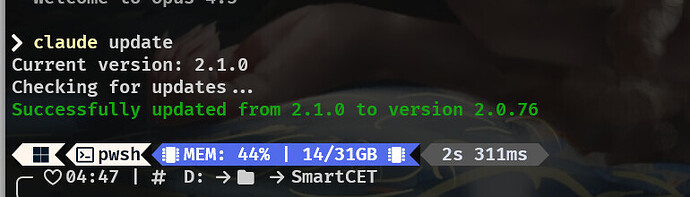
2026-01-07T21:38:00Z 又更新回来了 但是2.1.1 |
|
 |本站内容来源网友投稿或网络转载,如果有侵权的内容,请联系我们删除。|小黑屋|人人为我,我为人人!|
星颖资源网
|本站内容来源网友投稿或网络转载,如果有侵权的内容,请联系我们删除。|小黑屋|人人为我,我为人人!|
星颖资源网




 发表于 2026-1-8 04:21:56